
Solved

Asset Status when making future-dated work orders

  • June 15, 2026
  • 1 reply
  • 79 views

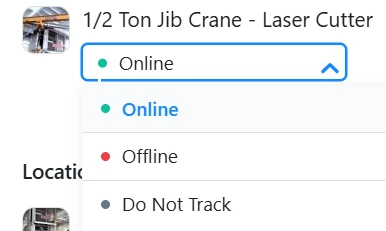
I am creating some future-dated repeating work orders for inspections on machines that repeat (e.g. monthly and annual inspections dated for Sept 2026). In the part where you can set the status of an Asset to online, offline, or do not track, I had set the option to Offline. After saving the future work order, the asset’s current status was set to Offline right at that time. Is there something I should be doing to have an asset set to Offline only while the work order is in progress rather than it being set Offline right away?  Picture included.


Best answer by AngelinaE

Hi MSTeam, thank you for reaching out. 

At this time you are correct that choosing the Offline status at the time of work order creation does change that asset’s status immediately. 

An alternative would be to include a required step in the work order’s procedure that directs the technician to set the asset offline, to align it with the actual work being done as closely as possible. Please let us know if you have any follow up questions.

1 reply

AngelinaE
Forum|alt.badge.img+2
  • MaintainX Team
  • Answer
  • June 19, 2026

Hi MSTeam, thank you for reaching out. 

At this time you are correct that choosing the Offline status at the time of work order creation does change that asset’s status immediately. 

An alternative would be to include a required step in the work order’s procedure that directs the technician to set the asset offline, to align it with the actual work being done as closely as possible. Please let us know if you have any follow up questions.