Question

Locations and sub-locations

  • October 1, 2026
  • 1 reply
  • 11 views

I’m setting up MaintainX for a vocational training center. I created “Edificio FP” as a parent location and “Área de Mantenimiento” as its sub-location. I now need to create three separate spaces within “Área de Mantenimiento”.

I can’t find an option to create sub-locations under it. Does MaintainX limit location hierarchies to one parent and one sub-location level? If so, what structure would you recommend to represent building → area → spaces while keeping maintenance work orders and assets easy to find?

Thank you!

1 reply

  • MaintainX Community Team
  • October 2, 2026

Hi ​@Raúl, 

Thanks for your question! You’re correct: MaintainX supports only 2 location levels: a parent location and its sub-locations. For additional levels, I’d recommend using the Assets module, which supports 3 levels on Premium and unlimited levels on Enterprise, with 6 available by default.

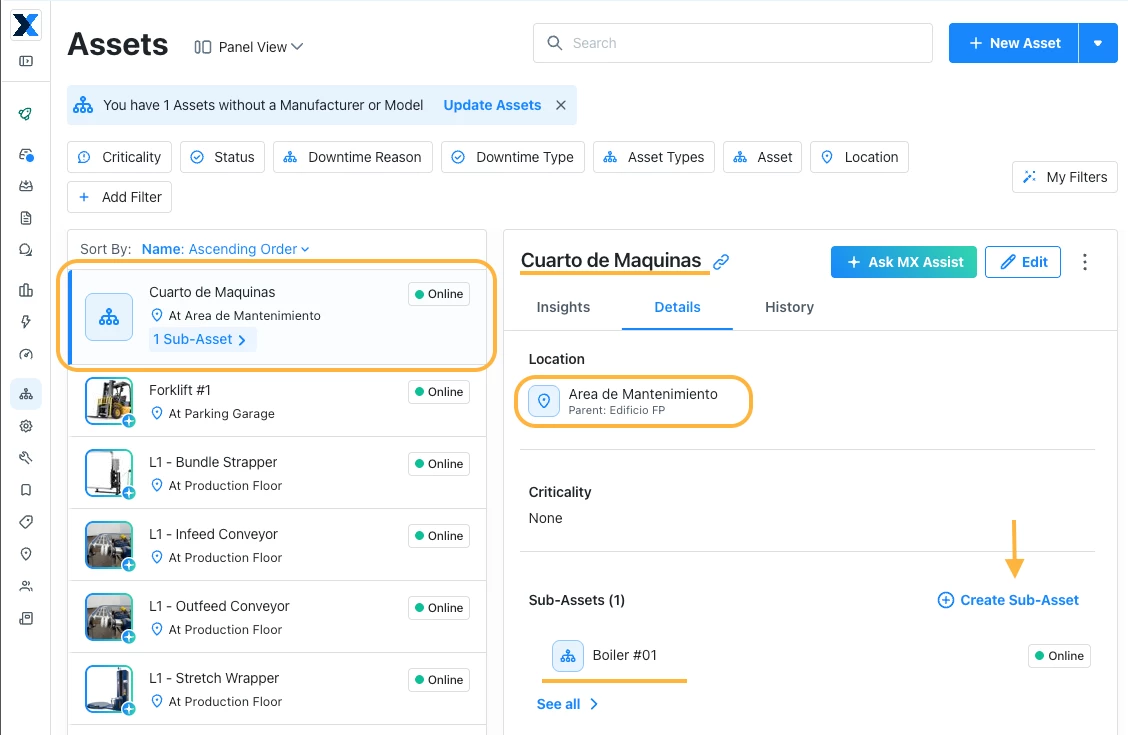
For your setup, keep “Edificio FP” as the parent location and “Área de Mantenimiento” as its sub-location. Then create each of your three spaces as a top-level asset and assign it to “Área de Mantenimiento.”

As shown in the attached screenshot, “Cuarto de Máquinas” would be a top-level asset, with equipment such as “Boiler #01” created beneath it as a sub-asset. Assign the equipment to “Área de Mantenimiento” as well, so you can find it using location filters.

This keeps your building and area organized under Locations, and your spaces and equipment organized under Assets. You can then track work orders against each space or individual piece of equipment.

You can learn more in our About Asset Hierarchies guide, including the available levels for each plan.

Hope this helps!